Roland MT-32
New to MIDI in DOS games?
If you’re not familiar with how MIDI works in DOS games, read the overview in the MIDI section first — it explains how DOS games use MIDI and the difference between the Roland MT-32 family of devices and Roland Sound Canvas / General MIDI.
The Roland MT-32 is a multi-timbre sound module released by Roland in 1987, the little sibling of the flagship Roland D-50 synthesiser released the same year. It uses Roland’s patented Linear Arithmetic (LA) synthesis, blending sample playback with digital synthesis. From 1988 onwards, starting with Sierra On-Line, it became the de facto high-end audio standard in DOS gaming — an era covered in more detail in the MIDI section.
Roland MT-32 is not General MIDI
Don’t confuse the Sound Canvas with the Roland MT-32. Although both are MIDI sound modules, the MT-32 is a programmable synthesiser with a very different sound engine, while the Sound Canvas supports General MIDI. Music written for one often sounds completely wrong on the other. See MT-32 vs General MIDI for details.
Notable games with MT-32 support
- Conquests of Camelot: The Search for the Grail (1990)
- Curse of Enchantia (1992)
- Dagger of Amon Ra, The (1992)
- Dark Queen of Krynn, The (1992)
- Darklands (1992)
- Elvira: Mistress of the Dark (1990)
- Eric the Unready (1993)
- Eye of the Beholder III: Assault on Myth Drannor (1993)
- F-19 Stealth Fighter (1988)
- Flight of the Amazon Queen (1995)
- Future Wars: Time Travelers (1989)
- Indiana Jones and the Fate of Atlantis (1992)
- Indiana Jones and the Last Crusade (1989)
- Inherit the Earth: Quest for the Orb (1994)
- Jagged Alliance (1995)
- King’s Quest IV: The Perils of Rosella (1988)
- King’s Quest V: Absence Makes the Heart Go Yonder! (1990)
- King’s Quest VI: Heir Today, Gone Tomorrow (1992)
- Legacy: Realm of Terror, The (1992)
- Legend of Kyrandia, The (1992)
- Leisure Suit Larry III: Passionate Patti in Pursuit of the Pulsating Pectorals (1989)
- Loom (1990)
- Lost Files of Sherlock Holmes, The (1992)
- Lure of the Temptress (1992)
- Might and Magic III: Isles of Terra (1991)
- Monkey Island 2: LeChuck’s Revenge (1991)
- Police Quest 2: The Vengeance (1988)
- Populous (1989)
- Prince of Persia (1990)
- Quest for Glory I: So You Want To Be A Hero (1989)
- Realms of Arkania: Blade of Destiny (1992)
- Rome: A.D. 92 (1992)
- Rules of Engagement (1991)
- Secret of Monkey Island, The (1990)
- Sid Meier’s Civilization (1991)
- Space Quest III: The Pirates of Pestulon (1989)
- Space Quest IV: Roger Wilco and the Time Rippers (1991)
- Spellcasting 101: Sorcerers Get All the Girls (1990)
- Spirit of Excalibur (1990)
- Star Trek: 25th Anniversary (1992)
- Ultima VI (1990)
- Wing Commander (1990)
- Wing Commander II: Vengeance of the Kilrathi (1991)
Setting up the MT-32 ROM images
Warning
Emulating the Roland MT-32 requires the original ROM data from the hardware itself — the MT-32 MIDI device cannot function without these files. We can’t bundle the ROM files with our release packages due to copyright restrictions, so you’ll need to obtain and install them yourself.
Download the MT-32 ROM files from
here, unpack the ZIP archive,
then move the contents of the MAME folder into the mt32-roms folder inside
your DOSBox Staging configuration folder:
| Platform | Default MT-32 ROM folder |
|---|---|
| Windows | C:\Users\<USERNAME>\AppData\DOSBox\mt32-roms\ |
| macOS | /Users/<USERNAME>/Library/Preferences/DOSBox/mt32-roms/ |
| Linux | $HOME/.local/share/dosbox/mt32-roms/ |
By doing so, you will make these ROMs globally available for all games.
This is what the contents of mt32-roms should look like:
mt32-roms
├── blue_ridge__mt32a.bin
├── blue_ridge__mt32b.bin
├── cm32l_control.rom
├── ctrl_cm32ln_1_00.rom
│   ...
Alternatively, you can create mt32-roms subfolders in your individual game
folders and put the ROMs there, then DOSBox Staging will find them when started
from these game folders. You can also set a custom MT-32 ROM folder via the
romdir setting.
Now you can enable the MT-32 MIDI device in your config:
For a step-by-step walkthrough of setting up the MT-32 with a specific game, see the Beneath a Steel Sky chapter of the Getting Started guide.
Listing the available models
Run the MIXER /LISTMIDI command to see the list of available MT-32 models:
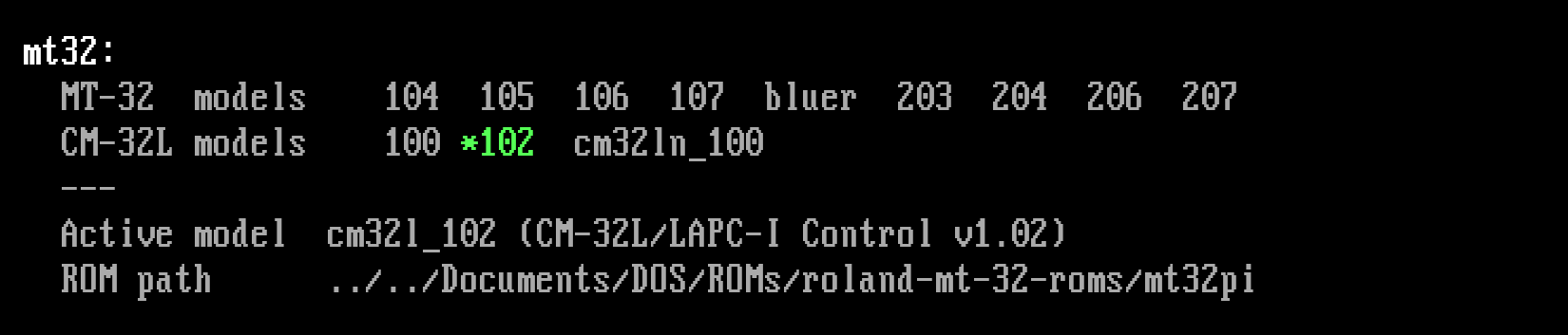
If the MT-32 is active, the selected model is highlighted.
Warning
Both the control and PCM ROMs need to be present for a given model. If
some model could not be detected, or you’re getting Failed to find ROMs
for model <model_name> error at startup, make sure that both ROM sets
have been copied to your ROM folder for that model.
Configuring games for the MT-32
DOSBox Staging emulates both the MT-32 sound module and the MPU-401 MIDI
interface that connected the PC and
the sound module. Most MT-32 games — including all older Sierra and Legend
Entertainment adventures — need the interface’s Intelligent Mode. Since
Intelligent Mode fully supports UART Mode too, it’s safe to leave
mpu401 at its default intelligent setting for most
MT-32 games.
Not all games that list “Roland MT-32” in their setup utility actually support it properly, and many games with excellent MT-32 music don’t advertise it prominently. The most reliable way to check is the community-maintained List of MT-32-compatible computer games on the VOGONS Wiki, which also notes which MT-32 model version works best for each title.
Note
Roland MT-32 support might be referred to as Roland MT-100, LAPC-I (sometimes mispelled as LAPC-1), CM-32L, or CM-64 in the game’s setup program. All these refer to the same thing; you only need to research which ROM version is recommended for the game and set it accordingly.
Some games offer a Roland MT-32 with Sound Blaster option which should be generally preferred to the plain Roland MT-32 option as it might enable additional digital music to be played on the Sound Blaster.
Choosing an MT-32 model
Old vs new MT-32
Roland released several revisions of the MT-32 hardware over the years. Games composed on the original old revision (ROM v1.0x) may sound different on the new revision (ROM v2.0x) — certain instruments might have a different timbre, some might sound distorted, and in the worst case the game might even lock up or crash. The opposite can also be true — certain games composed for the new v2.0x revision don’t work correctly with the old v1.0x ROM sets.
As a rule of thumb:
- Early Sierra games from 1988–1990 (e.g., King’s Quest IV, Police Quest II,
Space Quest
III,
Leisure Suit Larry
2,
Leisure Suit Larry
3)
composed on “old” hardware and generally sound more authentic on
mt32_old. - Games from 1991 onwards and most LucasArts titles work well on either revision.
- When in doubt, the VOGONS Wiki compatibility list notes the recommended revision for each game.
For most games, you only need to set model to mt32_old or
mt32_new in the [mt32] section. These will pick the best available v1.0x or v2.0x ROM set,
respectively. The minor ROM revision rarely matters at all.
[mt32]
# Early MT-32 games need this (e.g., older Sierra adventures)
model = mt32_old

# Later MT-32 games need this
model = mt32_new
Tip
You can pick a specific MT-32 model per game by taking advantage of per-game local configurations and configuration layering.
CM-32L
The Roland CM-32L released in 1989 is an MT-32 variant tailored for gaming and is generally the best overall choice. It is fully compatible with games that need the new MT-32 revision and adds 33 extra sound effects (gunshots, explosions, dog barks, footsteps, etc.). Some games use these for enhanced audio — a few titles only sound complete on a CM-32L (e.g., Curse of Enchantia and Fire & Ice). LucasArts was one of the main game studios that typically took advantage of the extra sound effects of the module.
The default auto value of the model setting prefers the CM-32L
when its ROMs are available, falling back to the best available MT-32 model
otherwise. You can also use cm32l to explicitly request the CM-32L without
fallback.
[mt32]
# Picks the CM-32L if available, otherwise MT-32 new or old
model = auto

# Set the CM-32L
model = cm32l
Tip
You can pick a specific MT-32 model per game by taking advantage of per-game local configurations and configuration layering.
Supported MT-32 models
ROMs are identified by their checksums, so file names do not matter. Both interleaved (mt32pi style) and non-interleaved (MAME style) ROM dumps are supported. The ROM sets below originate from the MAME video game preservation project and cover the whole MT-32 hardware family:
| Hardware | Year | model value(s) |
Notes |
|---|---|---|---|
| MT-32 “old” (v1.0x) | 1987 | mt32_104, mt32_105, mt32_106, mt32_107, mt32_old |
Original hardware; some games rely on firmware quirks present only in these early versions |
| MT-32 “new” (v2.0x) | 1987 | mt32_203, mt32_204 mt32_206, mt32_207, mt32_new |
Revised version with some firmware bugs and quirks removed |
| MT-32 BlueRidge | 1988 | mt32_bluer |
Third-party clone board |
| CM-32L / LAPC-I | 1989 | cm32l_100, cm32l_102, cm32l |
MT-32 “new”-compatible, plus 33 extra sound effects; LAPC-I is the same hardware on an ISA card |
| CM-32LN | 1992 | cm32ln_100 |
Japan-only CM-32L release for NEC PC-98 laptops; has a faster vibrato than the CM-32LN (break compatibility with some games) |
ROM lookup paths
If romdir is not set, DOSBox Staging searches the following folders for
MT-32 ROM files (in order). You can also place ROMs in an mt32-roms
subfolder inside the game’s working folder.
Windows
C:\Users\<USERNAME>\AppData\Local\DOSBox\mt32-roms\C:\mt32-rom-data\
macOS
/Users/<USERNAME>/Library/Preferences/DOSBox/mt32-roms//Users/<USERNAME>/Library/Audio/Sounds/MT32-Roms//usr/local/share/mt32-rom-data//usr/share/mt32-rom-data/
Linux
$XDG_DATA_HOME/dosbox/mt32-roms/(defaults to$HOME/.local/share/dosbox/mt32-roms/)$XDG_DATA_HOME/mt32-rom-data/(defaults to$HOME/.local/share/mt32-rom-data/)$XDG_DATA_DIRS/mt32-rom-data/(defaults to/usr/local/share/mt32-rom-data/and/usr/share/mt32-rom-data/)$XDG_CONFIG_HOME/dosbox/mt32-roms/(defaults to$HOME/.config/dosbox/mt32-roms/)
Mixer channel
The Roland MT-32 outputs to the MT32 mixer channel.
Legal notes
Important
By providing an easy-to-use Roland MT-32 emulation feature, we aim to preserve an important part of DOS gaming history for all to freely enjoy for posterity. The feature is only intended for personal use (e.g., retro gaming, or writing music as a hobby) and research purposes.
The Roland MT-32 ROM images are copyrighted by Roland Corporation, therefore they cannot be bundled with DOSBox.
You are not allowed to include the MT-32 ROM sets in any commercial software package without Roland’s explicit permission.
Configuration settings
Roland MT-32 settings are to be configured in the [mt32] section.
model
-
Roland MT-32/CM-32L model to use. You must have the ROM files for the selected model available (see
romdir). The lookup for the best models is performed in order as listed.Possible values:
autodefault – Pick the best available model.cm32l– Pick the best available CM-32L model.mt32_old– Pick the best available “old” MT-32 model (v1.0x).mt32_new– Pick the best available “new” MT-32 model (v2.0x).mt32– Pick the best available MT-32 model.<version>– Use the exact specified model version (e.g.,mt32_204).
Note
Run
MIXER /LISTMIDIto see the list of available models.
romdir
-
The folder containing the Roland MT-32/CM-32L ROMs (unset by default). The folder can be absolute or relative, or leave it unset to use the
mt32-romsfolder in your DOSBox configuration folder. Other common system locations will be checked as well.Note
The file names of the ROM files do not matter; the ROMs are identified by their checksums. Both interleaved and non-interleaved ROM files are supported.
mt32_filter
-
Filter for the Roland MT-32/CM-32L audio output.
Possible values:
offdefault – Don’t filter the output.<custom>– Custom filter definition; see Custom filter settings for details.